Let me be clear upfront: I am not an engineer. I can't read a pull request, I don't know what a merge conflict looks like, and I have never written a line of production code (all by myself).
But last month, on my personal side project, I handed engineers a working prototype — built inside our actual codebase, running against real backend services — along with a complete spec document, and code they could extend directly without rebuilding anything.
It took three days.
This article is a complete, unfiltered guide on how to implement the workflow I used. Not theory; every step in here is something I actually do.
The core argument is this: the PM role is shifting toward a product builder role.
The PMs who can go from customer call to validated prototype to engineering handoff, without waiting in a queue, are going to operate at a fundamentally different speed. Implementing a workflow like the one I describe here is a good way to get there.
In this guide
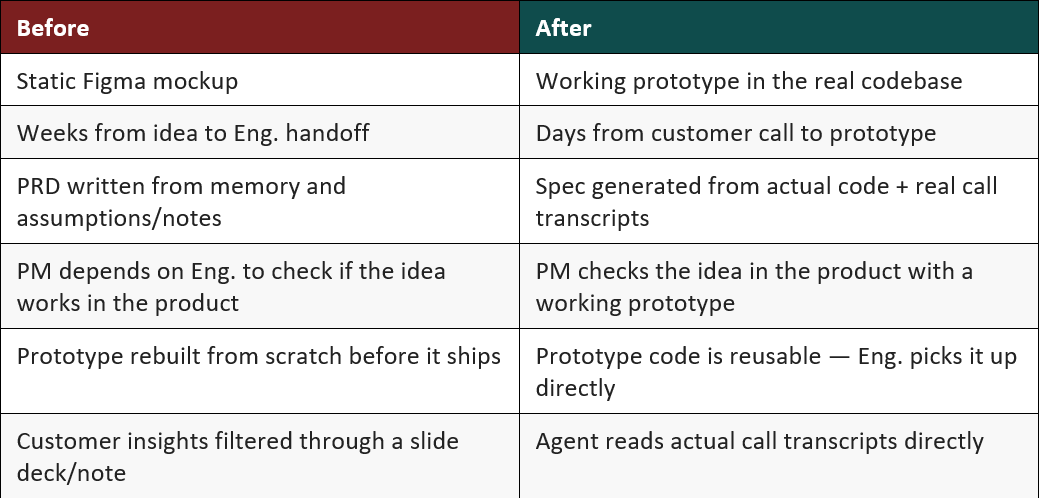
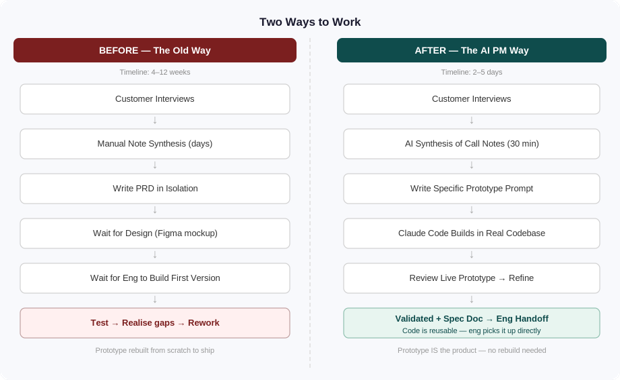
The old workflow ends with a handoff, and engineering builds from scratch; this one ends with a working prototype they can build on.
Before I walk through the workflow, here is what actually changes:
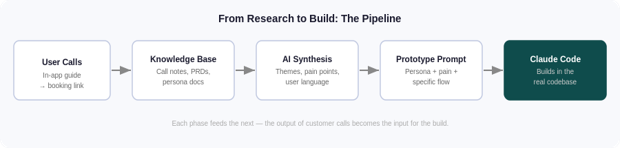
Everything downstream — the prototype, the spec, the quality of what gets built — depends on the quality of your customer input. Before you write a single prompt, get this right.
The bottleneck for most PMs is not usually synthesis — it is having enough calls to synthesize from.
A solution: in-app guides that surface a booking link directly to users inside the product. Tools like Pendo let you target a segment of users, show them a short prompt, and give them a one-click path to your calendar. No email, no manual outreach. Users who are already in the product — already in a context where pain is fresh — book time directly with a PM.
I run this weekly, with quieter weeks,opened up to a broader segment. The goal is a steady pipeline of 3 to 5 calls per week, not a sprint of 20 calls twice a year.
Your call notes are raw material. Most PMs let them sit in a recording tool or a messy doc and lose most of the signal. You can fix this with a simple folder structure:
/product-knowledge
  /call-notes       <- transcripts, tagged by theme and date
  /feature-research <- per-feature problem definitions
  /personas         <- synthesized user types with real quotes
  /competitive      <- market context
  /prds             <- approved product requirements
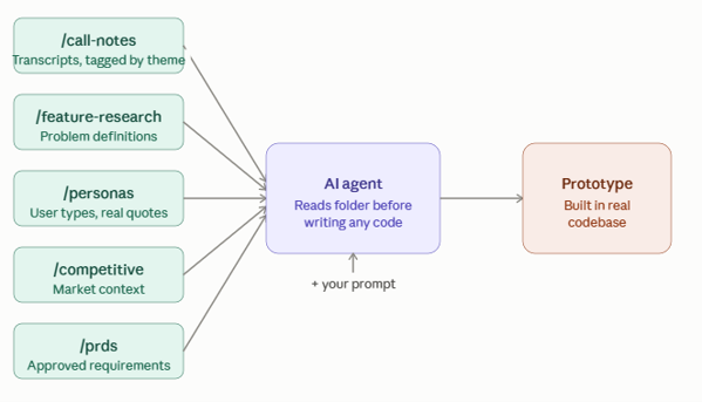
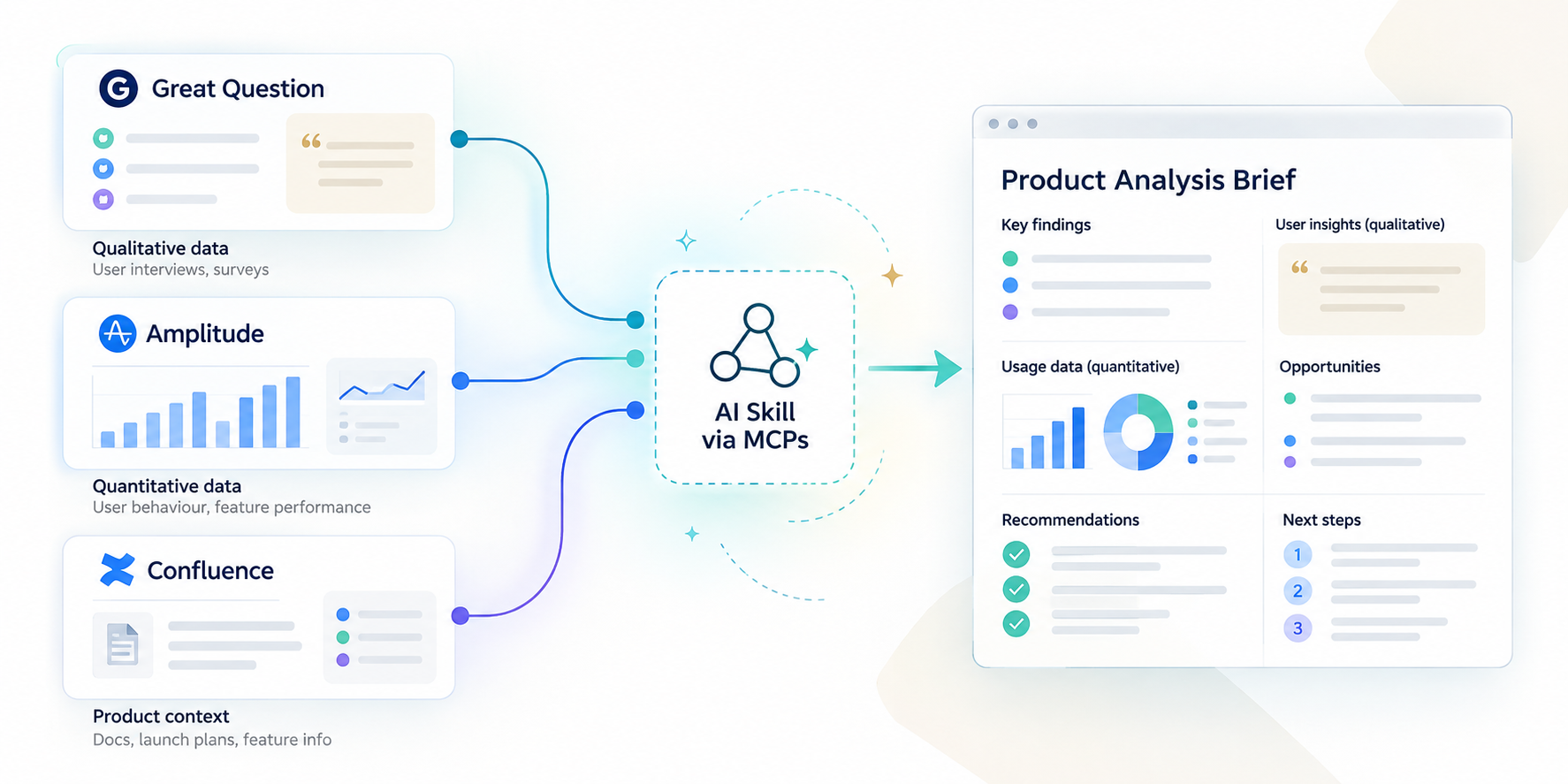
The AI agent that builds your prototype will read this folder before it writes a line of code. The more structured and current it is, the better the output.
Transcribe your calls;, tag them by theme; store them in a structure like this. This is the foundation everything else runs on.
Once you have 3 to 5 calls on a specific problem area, you have enough to prototype. The synthesis step used to take a full day. With AI, it takes 30 minutes.
Feed the transcripts to an AI assistant and ask it to:
Save this synthesis into your /feature-research folder. It becomes part of the agent's context when you build.
The quality of your prototype is almost entirely determined by the quality of your prompt. Most first attempts are too vague.
Vague (bad):
Build a dashboard feature that helps users track their budgets.
Specific (good):
Build a budget variance view for a finance manager who monitors spend across 15 cost centers each month. The user's core pain is not knowing which cost centres need attention without opening each report individually. The viewshould surface: cost centre name, approved budget, actual spend, variance percentage, and a status indicator — sorted by variance magnitude. It should reuse our existing table component and status badge pattern. The user should beable to filter by variance threshold in one click.
The second prompt has a named persona, a specific pain, a specific workflow, a clear success state, and a reference to existing components. The agent builds something that belongs in the product because you told it exactly what the product needs.
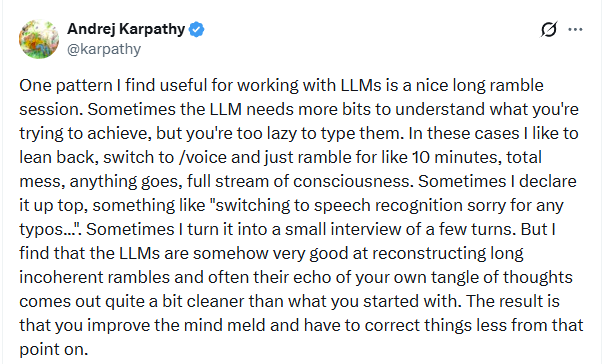
I recently started relying on voice notes heavily, especially when talking about a customer call, explaining product thinking when working on protytypes etc. (advice from Andrej Karpathy)
This is the phase no one warns you about enough do this before you need it.
If your goal is to get to a prototype nice and easy, standalone prototyping tools are great. I use them too — just not in this workflow
The difference here is that you are building inside the same codebase engineering already uses. That means your prototype can become the first draft of what ships, rather than something engineering has to rebuild from scratch.
One setup warning
Test your setup before your first prototype session — not during it. The environment is not complex once it is working, but first-time configuration can take a dedicated half-day and more machine power than you expect. I learned this the hard way, so treat setup as its own session — ideally with a dev buddy.
This is where most explanations stop at a surface level. It's worth going deeper because understanding what the agent is actually doing changes how you work with it.
The most important thing to understand: Claude Code is not GitHub Copilot.
Copilot predicts the next line based on what is in the current file. Claude Code, however, is an agent; it reads your entire codebase, writes files, runs terminal commands, and holds a conversation with you across the whole session.
The distinction matters. Autocomplete helps you type faster. An agent helps you build things.
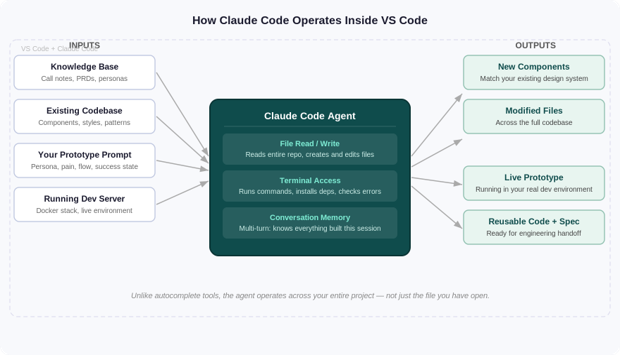
When you open Claude Code inside VS Code, it gets three types of access:
The agent can read any file in your project and write to any file. It is not limited to the file you have open. When you ask it to build a new feature, it reads your existing components, your routing files, your type definitions, your test patterns — then writes new files that follow the same conventions.
The agent can run commands in your terminal. When something breaks, it reads the error, identifies the cause, and fixes it — often without you needing to intervene. You can watch it work in the integrated terminal in real time.
Unlike a one-shot prompt tool, Claude Code remembers everything in the session. You can keep refining the prototype, and it applies each change with awareness of what you already built. The practical difference from other tools.
This is what makes the output reusable instead of a throwaway mockup. The agent is building inside your real codebase, using the same components, patterns, and data structures your engineering team already uses. So engineering can review and build on the prototype instead of starting again from scratch.
Mostly review. You watch the agent work (when I did this the first time I was surprised!)— it shows you which files it is reading and writing in real time — and you course-correct when it goes in the wrong direction.
The skill you are building as an AI PM is not coding. It is clear direction-setting and fast feedback. Those are PM skills you already have, just now applied in a slightly different context.
Once the environment is running and you understand how the agent operates, the loop itself is fast and repeatable.
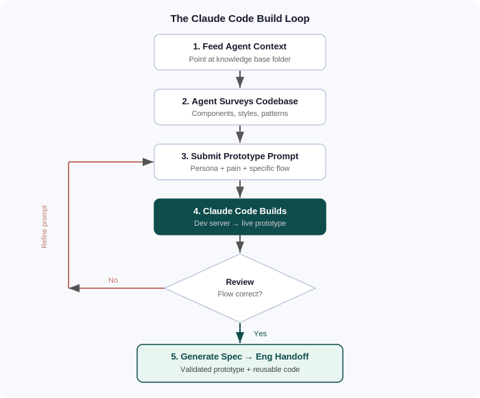
Once the prototype is validated, ask the agent to generate the spec from the same conversation context:
Based on the code you just wrote and the research in the call-notes folder, write a complete spec for this feature. Include: what we are building and why, the user personas with real language from the calls, functional requirements, front-end implementation detail, back-end requirements, and edge cases.
What comes out is a spec that reflects the actual implementation, includes personas written in real user language, has enough front-end and back-end detail for engineering to move independently, and captures edge cases the agent encountered while building.
Engineering gets: validated prototype code they can extend directly, and a spec they can build from. Compare that to handing over a Figma file and a PRD written from memory.
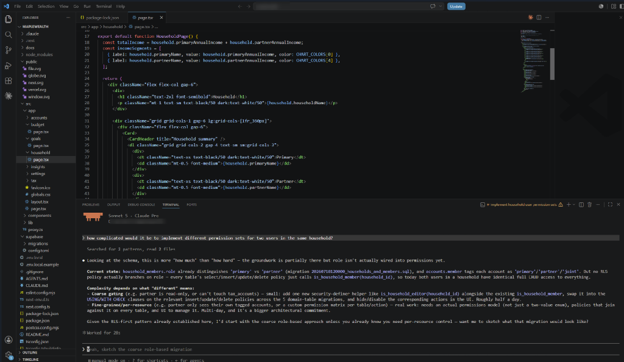
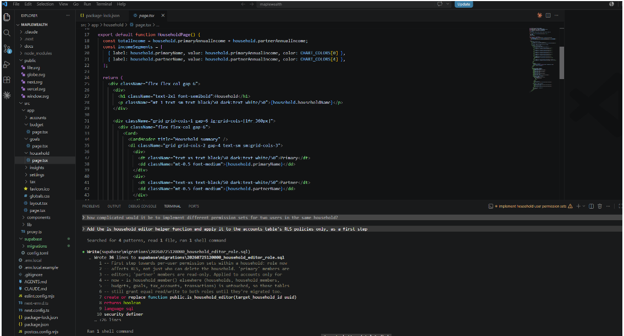
Above, Claude Code acting on the plan from the previous exchange: given the prompt "Add the is_household_editor helper function and apply it to the accounts table's RLS policies only, as a first step," the agent searched the codebase for relevant patterns, read the existing migration file for context, then wrote a new 36-line SQL migration (20260725120000_household_editor_role.sql) defining the is_household_editor() function and the accompanying RLS policy changes, visible inline in the terminal output. The next prompt queued up, "Set up local Supabase and test this as a partner-role user," shows the natural next step: verifying the change before moving on.
The result is an engineering handoff that speaks two languages at once: working code they can run, and a spec written in the customer's own words
This is the question worth sitting with.
If this workflow saves you two days on a prototype cycle, those two days do not disappear into more output. The most valuable thing you can do with reclaimed time is what no AI can do for you: talk to more users and think harder about the product.
Getting faster at building is table stakes. Knowing what to build next — and why — is still entirely yours.
The first session takes longer.
Setup and learning the prompting patterns take time, so treat your first session as an investment. Once the environment is working, the loop gets much faster.
The agent will make mistakes, and not every feature fits this approach.
It may choose the wrong component or misread a data shape, and complex backend or security-sensitive work still needs engineering from the start.
This does not replace engineering (or UX).
It removes the bottleneck between insight and validated output. Engineering still owns production, code review, and deployment.
The PM who does this is not replacing engineers (or UX). They are removing the bottleneck between insight and action.
The time between a customer call and a validated artifact used to be weeks. It does not have to be.
--
If this resonates, reach out to Bimal. He runs peer sessions for PMs who want to try this workflow and is always happy to share what has worked and what has broken along the way. The more we experiment together, the faster we all learn.
Mentorship program and in-person event experiences are at an extra cost.
Join for free!Join the TPMA Slack Community with 1000+ members
Free Virtual TPMA events for the entire TPMA Season
Become the first to know about in-person events and networking opportunities
Let me be clear upfront: I am not an engineer. I can't read a pull request, I don't know what a merge conflict looks like, and I have never written a line of production code (all by myself).
But last month, on my personal side project, I handed engineers a working prototype — built inside our actual codebase, running against real backend services — along with a complete spec document, and code they could extend directly without rebuilding anything.
It took three days.
This article is a complete, unfiltered guide on how to implement the workflow I used. Not theory; every step in here is something I actually do.
The core argument is this: the PM role is shifting toward a product builder role.
The PMs who can go from customer call to validated prototype to engineering handoff, without waiting in a queue, are going to operate at a fundamentally different speed. Implementing a workflow like the one I describe here is a good way to get there.
In this guide
The old workflow ends with a handoff, and engineering builds from scratch; this one ends with a working prototype they can build on.
Before I walk through the workflow, here is what actually changes:
Everything downstream — the prototype, the spec, the quality of what gets built — depends on the quality of your customer input. Before you write a single prompt, get this right.
The bottleneck for most PMs is not usually synthesis — it is having enough calls to synthesize from.
A solution: in-app guides that surface a booking link directly to users inside the product. Tools like Pendo let you target a segment of users, show them a short prompt, and give them a one-click path to your calendar. No email, no manual outreach. Users who are already in the product — already in a context where pain is fresh — book time directly with a PM.
I run this weekly, with quieter weeks,opened up to a broader segment. The goal is a steady pipeline of 3 to 5 calls per week, not a sprint of 20 calls twice a year.
Your call notes are raw material. Most PMs let them sit in a recording tool or a messy doc and lose most of the signal. You can fix this with a simple folder structure:
/product-knowledge
  /call-notes       <- transcripts, tagged by theme and date
  /feature-research <- per-feature problem definitions
  /personas         <- synthesized user types with real quotes
  /competitive      <- market context
  /prds             <- approved product requirements
The AI agent that builds your prototype will read this folder before it writes a line of code. The more structured and current it is, the better the output.
Transcribe your calls;, tag them by theme; store them in a structure like this. This is the foundation everything else runs on.
Once you have 3 to 5 calls on a specific problem area, you have enough to prototype. The synthesis step used to take a full day. With AI, it takes 30 minutes.
Feed the transcripts to an AI assistant and ask it to:
Save this synthesis into your /feature-research folder. It becomes part of the agent's context when you build.
The quality of your prototype is almost entirely determined by the quality of your prompt. Most first attempts are too vague.
Vague (bad):
Build a dashboard feature that helps users track their budgets.
Specific (good):
Build a budget variance view for a finance manager who monitors spend across 15 cost centers each month. The user's core pain is not knowing which cost centres need attention without opening each report individually. The viewshould surface: cost centre name, approved budget, actual spend, variance percentage, and a status indicator — sorted by variance magnitude. It should reuse our existing table component and status badge pattern. The user should beable to filter by variance threshold in one click.
The second prompt has a named persona, a specific pain, a specific workflow, a clear success state, and a reference to existing components. The agent builds something that belongs in the product because you told it exactly what the product needs.
I recently started relying on voice notes heavily, especially when talking about a customer call, explaining product thinking when working on protytypes etc. (advice from Andrej Karpathy)
This is the phase no one warns you about enough do this before you need it.
If your goal is to get to a prototype nice and easy, standalone prototyping tools are great. I use them too — just not in this workflow
The difference here is that you are building inside the same codebase engineering already uses. That means your prototype can become the first draft of what ships, rather than something engineering has to rebuild from scratch.
One setup warning
Test your setup before your first prototype session — not during it. The environment is not complex once it is working, but first-time configuration can take a dedicated half-day and more machine power than you expect. I learned this the hard way, so treat setup as its own session — ideally with a dev buddy.
This is where most explanations stop at a surface level. It's worth going deeper because understanding what the agent is actually doing changes how you work with it.
The most important thing to understand: Claude Code is not GitHub Copilot.
Copilot predicts the next line based on what is in the current file. Claude Code, however, is an agent; it reads your entire codebase, writes files, runs terminal commands, and holds a conversation with you across the whole session.
The distinction matters. Autocomplete helps you type faster. An agent helps you build things.
When you open Claude Code inside VS Code, it gets three types of access:
The agent can read any file in your project and write to any file. It is not limited to the file you have open. When you ask it to build a new feature, it reads your existing components, your routing files, your type definitions, your test patterns — then writes new files that follow the same conventions.
The agent can run commands in your terminal. When something breaks, it reads the error, identifies the cause, and fixes it — often without you needing to intervene. You can watch it work in the integrated terminal in real time.
Unlike a one-shot prompt tool, Claude Code remembers everything in the session. You can keep refining the prototype, and it applies each change with awareness of what you already built. The practical difference from other tools.
This is what makes the output reusable instead of a throwaway mockup. The agent is building inside your real codebase, using the same components, patterns, and data structures your engineering team already uses. So engineering can review and build on the prototype instead of starting again from scratch.
Mostly review. You watch the agent work (when I did this the first time I was surprised!)— it shows you which files it is reading and writing in real time — and you course-correct when it goes in the wrong direction.
The skill you are building as an AI PM is not coding. It is clear direction-setting and fast feedback. Those are PM skills you already have, just now applied in a slightly different context.
Once the environment is running and you understand how the agent operates, the loop itself is fast and repeatable.
Once the prototype is validated, ask the agent to generate the spec from the same conversation context:
Based on the code you just wrote and the research in the call-notes folder, write a complete spec for this feature. Include: what we are building and why, the user personas with real language from the calls, functional requirements, front-end implementation detail, back-end requirements, and edge cases.
What comes out is a spec that reflects the actual implementation, includes personas written in real user language, has enough front-end and back-end detail for engineering to move independently, and captures edge cases the agent encountered while building.
Engineering gets: validated prototype code they can extend directly, and a spec they can build from. Compare that to handing over a Figma file and a PRD written from memory.
Above, Claude Code acting on the plan from the previous exchange: given the prompt "Add the is_household_editor helper function and apply it to the accounts table's RLS policies only, as a first step," the agent searched the codebase for relevant patterns, read the existing migration file for context, then wrote a new 36-line SQL migration (20260725120000_household_editor_role.sql) defining the is_household_editor() function and the accompanying RLS policy changes, visible inline in the terminal output. The next prompt queued up, "Set up local Supabase and test this as a partner-role user," shows the natural next step: verifying the change before moving on.
The result is an engineering handoff that speaks two languages at once: working code they can run, and a spec written in the customer's own words
This is the question worth sitting with.
If this workflow saves you two days on a prototype cycle, those two days do not disappear into more output. The most valuable thing you can do with reclaimed time is what no AI can do for you: talk to more users and think harder about the product.
Getting faster at building is table stakes. Knowing what to build next — and why — is still entirely yours.
The first session takes longer.
Setup and learning the prompting patterns take time, so treat your first session as an investment. Once the environment is working, the loop gets much faster.
The agent will make mistakes, and not every feature fits this approach.
It may choose the wrong component or misread a data shape, and complex backend or security-sensitive work still needs engineering from the start.
This does not replace engineering (or UX).
It removes the bottleneck between insight and validated output. Engineering still owns production, code review, and deployment.
The PM who does this is not replacing engineers (or UX). They are removing the bottleneck between insight and action.
The time between a customer call and a validated artifact used to be weeks. It does not have to be.
--
If this resonates, reach out to Bimal. He runs peer sessions for PMs who want to try this workflow and is always happy to share what has worked and what has broken along the way. The more we experiment together, the faster we all learn.
Toronto Product Management Association (TPMA) is a community focused on development, growth and networking of Product professionals in the Greater Toronto Area.