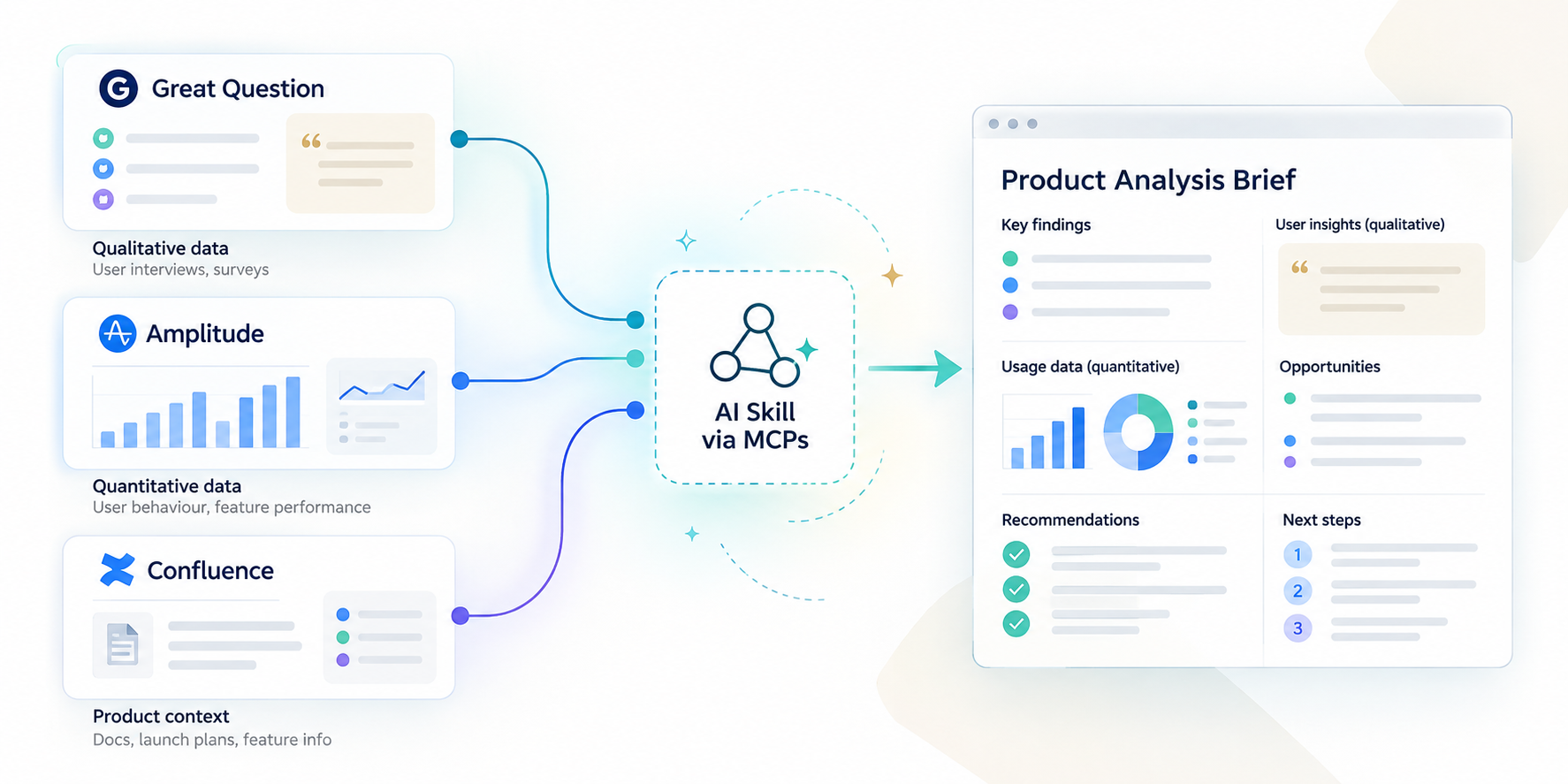
NASA's Small Business Innovation Research (SBIR) program funds startups doing cutting-edge work across aerospace, defence systems, and deep tech - but the harder question it kept running into was whether those companies had actually progressed after receiving the money.
Had they secured follow-on funding? Were they moving toward Phase III commercialization? Answering that required pulling structured KPI data tied to each award - and doing it company by company, by hand.
For a single report cycle, that was a full day of my time.
Not a full day of deep thinking. A complete day of lookup, copy, paste, repeat. The work was tedious and almost entirely mechanical. The actual judgment call on each company took maybe five minutes. The other fifty-five were overhead.
That gap between where human judgment was genuinely needed and where it was just being dragged along for the ride is what I kept coming back to. If I could collapse the overhead, the analysis itself would get sharper - more time on the five minutes that actually mattered, less on the fifty-five that didn't.
This pattern isn't unique to federal grant analysis. Any PM managing recurring reporting cycles - OKR tracking, customer health scoring, competitive monitoring - is likely carrying the same ratio of mechanical overhead to actual judgment. The question worth asking is whether the fifty-five minutes can be given back
My first instinct wasn't Zapier. I looked at Make and n8n first; both are capable tools, and n8n in particular appealed to me because of how much control it gives you over logic. But I kept running into the same friction: the setup overhead for what I needed was significant, and I was working fast in a context where iteration speed mattered more than architectural elegance.
Zapier surfaced partly through research and partly through elimination. What made it stick was the combination of the native AI by Zapier step - which meant I didn't need to wire up an OpenAI integration from the beginning - and how quickly I could get a working prototype in front of real data - I technically had less than a week to get an MVP in front of the client. The tradeoff is less flexibility than n8n, but for this problem, the speed of iteration won out.
The honest version of "stumbling upon" a tool is usually: you try two or three things, one of them removes enough friction at the right moment, and you commit. That's what happened here.
The final workflow runs five steps, as depicted below.
What the diagram doesn't show is how many iterations it took to get there. The code would break mid-way, the API response would take too long, or often be incorrect, and initially, I would get the order wrong; first placing code by Zapier after Google Sheets instead of Webhooks, which would get the wrong parsing altogether at the prompting stage.
But ultimately this is where it landed - so let's break down the steps.
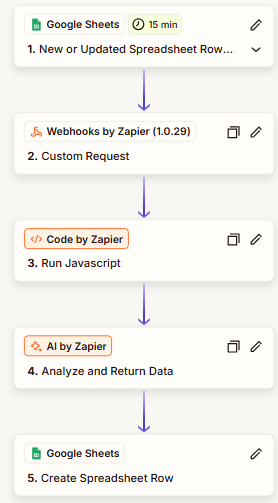
Step 1: Google Sheets trigger - monitoring for updates
The Zap watches a filtered worksheet for new or updated rows, keyed to a unique company identifier column.The trigger fires when a new row appears in the filtered 'Companies' worksheet with a populated UEI column - that unique identifier is what the rest of the pipeline uses to match against the federal database.
Here’s how:
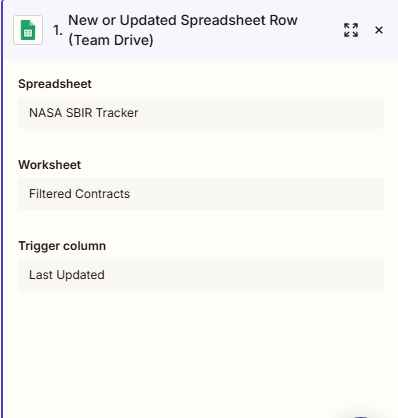
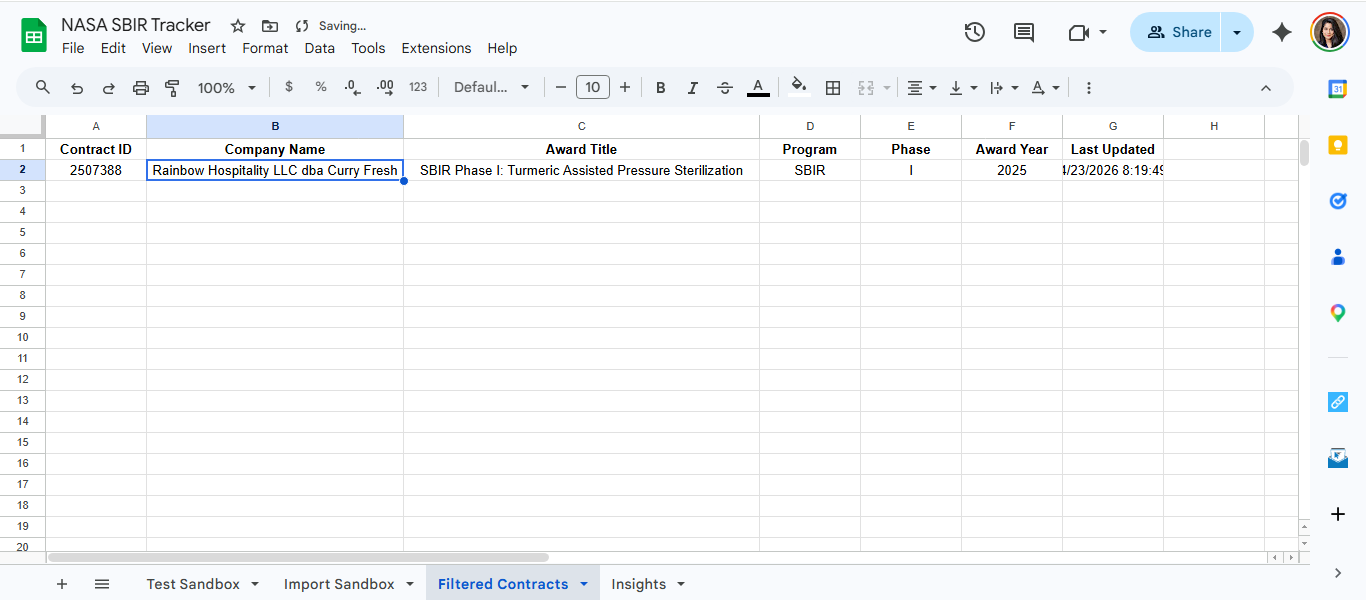
Using a specific trigger column rather than watching the whole sheet was a deliberate early decision. It prevents the workflow from firing on formatting edits or incidental changes, which becomes important when you're debugging and making frequent small edits.
Step 2: Webhooks - pulling from the federal database
For a reliable workflow, webhooks were added so KPI insights were only generated when the contract data could first be confirmed through the federal database. This reduced manual verification and made the recommendations more grounded and traceable.
The goal of this step was to correctly catch relevant follow-on contracts from federal databases through UEIs/Contract ID, and squarely inform the KPI metric with a ‘Yes’ or ‘No’; this would make insight generation further grounded in truth before giving recommendation.
It became more about understanding how the APIs behaved within the workflow and iteratively testing different request structures inside Zapier until the automation returned reliable contract matches. The focus was less on building custom infrastructure and more on ensuring the workflow produced dependable business insights that showed a startup’s commercial viability.
This step replaced most manual work. A custom webhook call goes out to the federal database API to pull enriched company data the moment a row triggers the Zap.
This is also where I spent the most time stuck.
Yes, things had to get technical...
The first real wall I hit was response time. The API was slow enough that early runs were timing out before returning anything useful.
The second was more fundamental: I spent longer than I'd like to admit working out whether the endpoint I needed required a POST or GET request. This was a hands-on process with API integrations and iterative webhook testing inside Zapier to get the workflow functioning reliably.
Federal APIs are not always well-documented for this kind of use case, and the wrong method meant I was either getting errors or, worse, getting back a response that looked fine but wasn't matching anything - just "No" returned for every company, every time.
Getting the matching right required understanding how a federal database structures its data well enough to send queries it could actually answer. Once that clicked, I wanted to layer in more matching indicators to strengthen the signal.
That's when I hit the next constraint: the way the API was being called, combined with data limitations on the federal side, made it difficult to reliably pull richer data at scale without the workflow becoming brittle. Codes aren't the same across federal databases, and each has a different API layer. APIs across federal databases don’t all “speak” the same way, so part of the challenge was figuring out which inputs would actually return reliable matches - almost like plugging a cable into the right port before the connection starts working properly
Step 3: Code by Zapier - cleaning the response
Most API responses came back with far more information than the workflow actually needed, and sometimes in inconsistent formats.
This step was mainly about simplifying the response so the AI layer only received the fields relevant to KPI scoring and insight generation - same as organizing raw notes before handing them to someone for analysis.
I created this JavaScript step below to flatten the nested JSON from the webhook, strip irrelevant fields, and format the output so the AI step receives clean, structured input.
Skipping this step and passing raw API output directly to the AI produced inconsistent results - so the model ended up interpreting structure instead of doing analysis.

This made it efficient - everything gets cleaned before it moves forward.
Step 4: AI by Zapier - analysis and synthesis
This is where judgment happens. All the code and parsing now stops here to make logical sense and clean analysis.
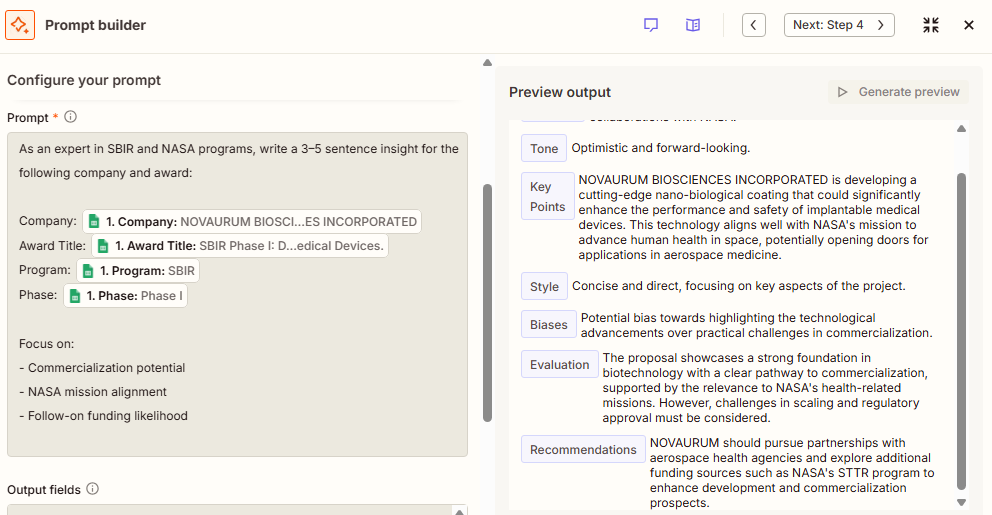
The cleaned company data gets passed to an LLM with a structured prompt that asks for a written summary, a relevance assessment, and key extracted data points - all returned together.
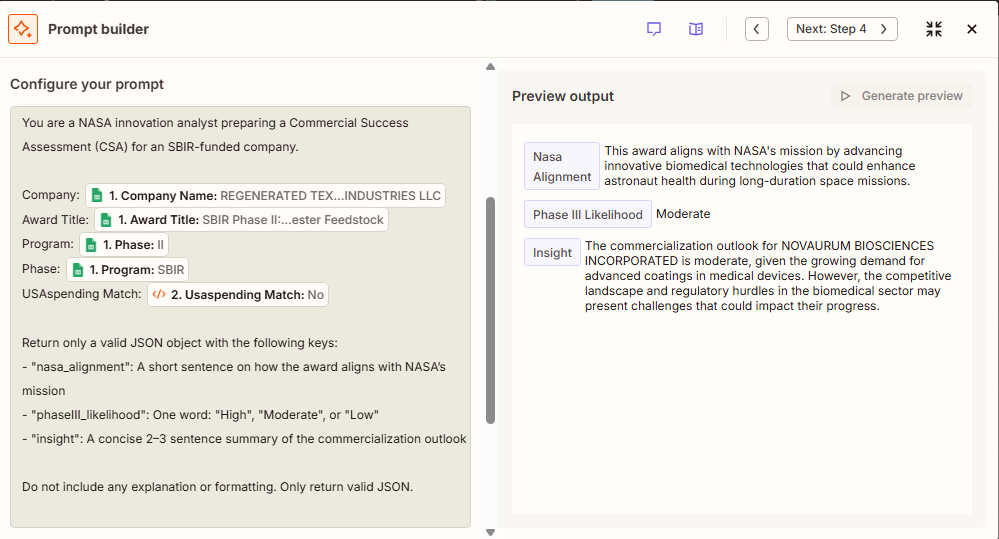
This prompt took the most iteration to get right. Getting it to return consistently structured output - so Step 5 could write results cleanly to a row - required being explicit about format and giving the model an example of what good output looked like.
Small changes in prompt structure, formatting, or field selection noticeably changed the quality and consistency of the final insight output, so a large part of the work became iterative testing and refinement
I worked on understanding which fields would make the insight stronger - like Award Title, Program, Phase - which to keep, which to remove. This led me to understand how the keys were being understood by the LLMs from the database, and the spread-sheet itself, while improving its intelligence layer.
Below ishow it looked iteratively.
First Iteration:
(Preview output shows what information the LLM was designated to return to Google Sheet field(s))
Second Iteration:
Then finally, here’s the insights generation:
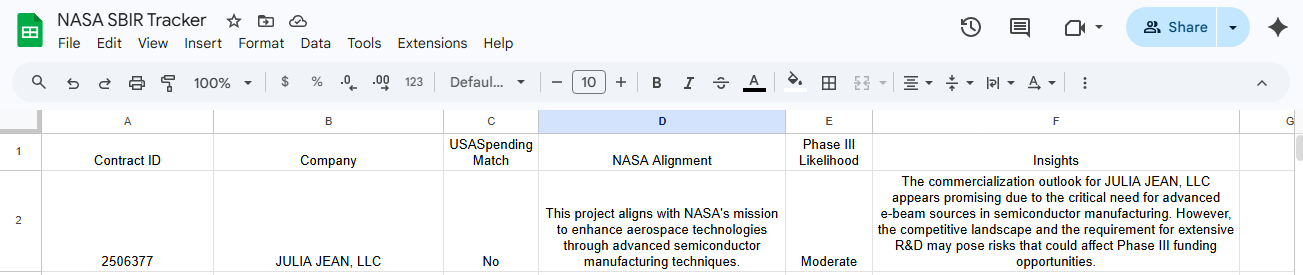
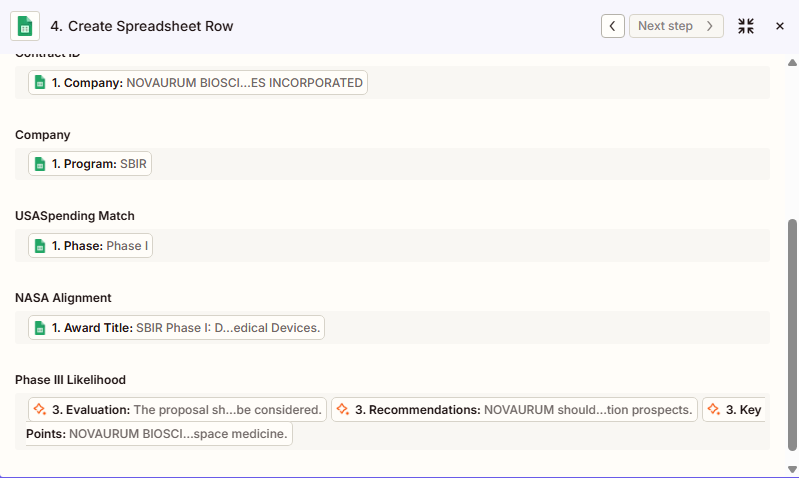
Step 5: Google Sheets - writing results back
A full circle moment where all the structure from the automation materializes in the selected columns.
The final step writes the AI's output to a new row in the output sheet, mapped to the right columns. A human reviewer can then scan synthesized output rather than starting from a blank page - which is where the actual time savings land.
What worked was the core concept. The automation handled the overhead reliably enough that the part requiring genuine judgment - reviewing the AI's output and making a call - became the whole job instead of a fraction of it.
The surprising part was that the automation did not reduce the need for judgment; it made judgment more concentrated.
Once repetitive validation and data gathering were compressed, it became easier to spot weak signals, inconsistent recommendations, or companies that looked strong on paper but lacked commercialization depth
Going from a full day to under two hours wasn't about the AI being smarter than me. It was about removing the fifty-five minutes of mechanical work per company so I could focus on the five minutes that mattered.
For PMs, this is the real design win: the automation didn't replace the analyst; it changed what the analyst's time was worth
1. Better matching logic, not failures.
The Federal Database API integration was the most brittle part of the pipeline. If I were building this again, I'd invest earlier in fallback matching - keyword-based logic with clearly defined rules for when to use it, rather than treating API failure as a dead end. The fallback shouldn't just be "try again." It should be a deliberate secondary matching strategy with its own logic, so the pipeline degrades gracefully instead of stopping.
2. A stronger intelligence layer, with confidence thresholds.
Error states should be first-class inputs to the LLM, not afterthoughts. If an API call fails or returns a weak match, that information should be part of what the model works with, not hidden. I'd also build explicit confidence thresholds into the prompt logic - conditions under which the model flags its own output as uncertain rather than presenting a low-confidence analysis as if it were solid. That distinction matters a lot when a human is reviewing downstream.
3. Add deterministic scoring in the prompt.
Here’s one way I believe the scoring could improve its logic assessment while fitting the metric into one of the three buckets.
An example:
Assign Phase III Likelihood:
4. Facilitate More Focused Human Review.
The current workflow routes everything to an output sheet and a human checks it. That's fine, but it's passive.
What I'd build next is a Slack notification step that fires specifically when flagging conditions are met; low confidence outputs, failed API calls that fell back to keyword matching, anything where the pipeline is less certain than usual.
That way human review is targeted, not blanket. The right threshold for when to flag is itself a design decision worth spending time on. Too sensitive and every row gets flagged; too loose and the flags stop meaning anything.
The bigger shift in thinking is this: the goal isn't to automate the human out. It's to automate the overhead so the human shows up exactly when and where they're needed - with better information and less noise than before - to bring clarity of thought into the process.
That's a product decision as much as a technical one - and it's one worth making deliberately.
Mentorship program and in-person event experiences are at an extra cost.
Join for free!Join the TPMA Slack Community with 1000+ members
Free Virtual TPMA events for the entire TPMA Season
Become the first to know about in-person events and networking opportunities
NASA's Small Business Innovation Research (SBIR) program funds startups doing cutting-edge work across aerospace, defence systems, and deep tech - but the harder question it kept running into was whether those companies had actually progressed after receiving the money.
Had they secured follow-on funding? Were they moving toward Phase III commercialization? Answering that required pulling structured KPI data tied to each award - and doing it company by company, by hand.
For a single report cycle, that was a full day of my time.
Not a full day of deep thinking. A complete day of lookup, copy, paste, repeat. The work was tedious and almost entirely mechanical. The actual judgment call on each company took maybe five minutes. The other fifty-five were overhead.
That gap between where human judgment was genuinely needed and where it was just being dragged along for the ride is what I kept coming back to. If I could collapse the overhead, the analysis itself would get sharper - more time on the five minutes that actually mattered, less on the fifty-five that didn't.
This pattern isn't unique to federal grant analysis. Any PM managing recurring reporting cycles - OKR tracking, customer health scoring, competitive monitoring - is likely carrying the same ratio of mechanical overhead to actual judgment. The question worth asking is whether the fifty-five minutes can be given back
My first instinct wasn't Zapier. I looked at Make and n8n first; both are capable tools, and n8n in particular appealed to me because of how much control it gives you over logic. But I kept running into the same friction: the setup overhead for what I needed was significant, and I was working fast in a context where iteration speed mattered more than architectural elegance.
Zapier surfaced partly through research and partly through elimination. What made it stick was the combination of the native AI by Zapier step - which meant I didn't need to wire up an OpenAI integration from the beginning - and how quickly I could get a working prototype in front of real data - I technically had less than a week to get an MVP in front of the client. The tradeoff is less flexibility than n8n, but for this problem, the speed of iteration won out.
The honest version of "stumbling upon" a tool is usually: you try two or three things, one of them removes enough friction at the right moment, and you commit. That's what happened here.
The final workflow runs five steps, as depicted below.
What the diagram doesn't show is how many iterations it took to get there. The code would break mid-way, the API response would take too long, or often be incorrect, and initially, I would get the order wrong; first placing code by Zapier after Google Sheets instead of Webhooks, which would get the wrong parsing altogether at the prompting stage.
But ultimately this is where it landed - so let's break down the steps.
Step 1: Google Sheets trigger - monitoring for updates
The Zap watches a filtered worksheet for new or updated rows, keyed to a unique company identifier column.The trigger fires when a new row appears in the filtered 'Companies' worksheet with a populated UEI column - that unique identifier is what the rest of the pipeline uses to match against the federal database.
Here’s how:
Using a specific trigger column rather than watching the whole sheet was a deliberate early decision. It prevents the workflow from firing on formatting edits or incidental changes, which becomes important when you're debugging and making frequent small edits.
Step 2: Webhooks - pulling from the federal database
For a reliable workflow, webhooks were added so KPI insights were only generated when the contract data could first be confirmed through the federal database. This reduced manual verification and made the recommendations more grounded and traceable.
The goal of this step was to correctly catch relevant follow-on contracts from federal databases through UEIs/Contract ID, and squarely inform the KPI metric with a ‘Yes’ or ‘No’; this would make insight generation further grounded in truth before giving recommendation.
It became more about understanding how the APIs behaved within the workflow and iteratively testing different request structures inside Zapier until the automation returned reliable contract matches. The focus was less on building custom infrastructure and more on ensuring the workflow produced dependable business insights that showed a startup’s commercial viability.
This step replaced most manual work. A custom webhook call goes out to the federal database API to pull enriched company data the moment a row triggers the Zap.
This is also where I spent the most time stuck.
Yes, things had to get technical...
The first real wall I hit was response time. The API was slow enough that early runs were timing out before returning anything useful.
The second was more fundamental: I spent longer than I'd like to admit working out whether the endpoint I needed required a POST or GET request. This was a hands-on process with API integrations and iterative webhook testing inside Zapier to get the workflow functioning reliably.
Federal APIs are not always well-documented for this kind of use case, and the wrong method meant I was either getting errors or, worse, getting back a response that looked fine but wasn't matching anything - just "No" returned for every company, every time.
Getting the matching right required understanding how a federal database structures its data well enough to send queries it could actually answer. Once that clicked, I wanted to layer in more matching indicators to strengthen the signal.
That's when I hit the next constraint: the way the API was being called, combined with data limitations on the federal side, made it difficult to reliably pull richer data at scale without the workflow becoming brittle. Codes aren't the same across federal databases, and each has a different API layer. APIs across federal databases don’t all “speak” the same way, so part of the challenge was figuring out which inputs would actually return reliable matches - almost like plugging a cable into the right port before the connection starts working properly
Step 3: Code by Zapier - cleaning the response
Most API responses came back with far more information than the workflow actually needed, and sometimes in inconsistent formats.
This step was mainly about simplifying the response so the AI layer only received the fields relevant to KPI scoring and insight generation - same as organizing raw notes before handing them to someone for analysis.
I created this JavaScript step below to flatten the nested JSON from the webhook, strip irrelevant fields, and format the output so the AI step receives clean, structured input.
Skipping this step and passing raw API output directly to the AI produced inconsistent results - so the model ended up interpreting structure instead of doing analysis.
This made it efficient - everything gets cleaned before it moves forward.
Step 4: AI by Zapier - analysis and synthesis
This is where judgment happens. All the code and parsing now stops here to make logical sense and clean analysis.
The cleaned company data gets passed to an LLM with a structured prompt that asks for a written summary, a relevance assessment, and key extracted data points - all returned together.
This prompt took the most iteration to get right. Getting it to return consistently structured output - so Step 5 could write results cleanly to a row - required being explicit about format and giving the model an example of what good output looked like.
Small changes in prompt structure, formatting, or field selection noticeably changed the quality and consistency of the final insight output, so a large part of the work became iterative testing and refinement
I worked on understanding which fields would make the insight stronger - like Award Title, Program, Phase - which to keep, which to remove. This led me to understand how the keys were being understood by the LLMs from the database, and the spread-sheet itself, while improving its intelligence layer.
Below ishow it looked iteratively.
First Iteration:
(Preview output shows what information the LLM was designated to return to Google Sheet field(s))
Second Iteration:
Then finally, here’s the insights generation:
Step 5: Google Sheets - writing results back
A full circle moment where all the structure from the automation materializes in the selected columns.
The final step writes the AI's output to a new row in the output sheet, mapped to the right columns. A human reviewer can then scan synthesized output rather than starting from a blank page - which is where the actual time savings land.
What worked was the core concept. The automation handled the overhead reliably enough that the part requiring genuine judgment - reviewing the AI's output and making a call - became the whole job instead of a fraction of it.
The surprising part was that the automation did not reduce the need for judgment; it made judgment more concentrated.
Once repetitive validation and data gathering were compressed, it became easier to spot weak signals, inconsistent recommendations, or companies that looked strong on paper but lacked commercialization depth
Going from a full day to under two hours wasn't about the AI being smarter than me. It was about removing the fifty-five minutes of mechanical work per company so I could focus on the five minutes that mattered.
For PMs, this is the real design win: the automation didn't replace the analyst; it changed what the analyst's time was worth
1. Better matching logic, not failures.
The Federal Database API integration was the most brittle part of the pipeline. If I were building this again, I'd invest earlier in fallback matching - keyword-based logic with clearly defined rules for when to use it, rather than treating API failure as a dead end. The fallback shouldn't just be "try again." It should be a deliberate secondary matching strategy with its own logic, so the pipeline degrades gracefully instead of stopping.
2. A stronger intelligence layer, with confidence thresholds.
Error states should be first-class inputs to the LLM, not afterthoughts. If an API call fails or returns a weak match, that information should be part of what the model works with, not hidden. I'd also build explicit confidence thresholds into the prompt logic - conditions under which the model flags its own output as uncertain rather than presenting a low-confidence analysis as if it were solid. That distinction matters a lot when a human is reviewing downstream.
3. Add deterministic scoring in the prompt.
Here’s one way I believe the scoring could improve its logic assessment while fitting the metric into one of the three buckets.
An example:
Assign Phase III Likelihood:
4. Facilitate More Focused Human Review.
The current workflow routes everything to an output sheet and a human checks it. That's fine, but it's passive.
What I'd build next is a Slack notification step that fires specifically when flagging conditions are met; low confidence outputs, failed API calls that fell back to keyword matching, anything where the pipeline is less certain than usual.
That way human review is targeted, not blanket. The right threshold for when to flag is itself a design decision worth spending time on. Too sensitive and every row gets flagged; too loose and the flags stop meaning anything.
The bigger shift in thinking is this: the goal isn't to automate the human out. It's to automate the overhead so the human shows up exactly when and where they're needed - with better information and less noise than before - to bring clarity of thought into the process.
That's a product decision as much as a technical one - and it's one worth making deliberately.
Toronto Product Management Association (TPMA) is a community focused on development, growth and networking of Product professionals in the Greater Toronto Area.
.jpg)